Ferentin Is Now in the Okta Integration Network, with Cross App Access for AI Agents
Ferentin is now published in the Okta Integration Network. Any Okta customer can add Ferentin from the catalog for two things. People sign in to Ferentin with Okta through OpenID Connect, both the administrators who run it and the employees who use it. And AI agents registered in Okta can connect to Ferentin through Cross App Access (XAA), with no consent screen and no long-lived token on the employee's laptop.
The result is a single chain of authority. Okta decides who may sign in to Ferentin, and which agents may connect on their behalf. Ferentin decides what each of those people and agents may do on every MCP call after that.
Why this matters now
Most companies already run more than one AI agent. A developer uses Claude Code, an analyst uses ChatGPT, and a team has an agent in Slack. Each one wants to reach Jira, GitHub, Salesforce and the internal tools behind them. Without help, each agent collects its own OAuth grants, one consent screen at a time, and the security team learns about them from the audit log, if at all.
Cross App Access moves that decision to the identity provider. Okta already knows who the employee is, which apps they're assigned and which agents the company has approved. XAA lets Okta use that knowledge to approve an agent's connection to another app directly. The standard underneath it is the Identity Assertion JWT Authorization Grant (ID-JAG), and the MCP ecosystem knows the same pattern as Enterprise-Managed Authorization.
Both of those start with a person, so that's where the integration starts too.
Okta sign-in for administrators and end users
Ferentin is an OpenID Connect relying party. Okta authenticates the person, applies your sign-on policies and MFA, and sends them back to Ferentin signed in. Ferentin never sees or stores a password. A single Okta application covers everyone who uses Ferentin.
Administrators sign in to the Ferentin Admin Console, where they manage policies, MCP servers, LLM providers and audit. They can start from Ferentin's sign-in page or click the Ferentin tile on their Okta dashboard. Okta decides who can authenticate, and Ferentin decides who is an administrator. Assigning someone to the app in Okta doesn't make them a Ferentin admin. You add them as an administrator with a specific role, or you map an Okta group to one. Admin access is also kept short: tokens that carry administrator rights expire after 15 minutes.
End users sign in to the Ferentin User Console with the same Okta account. That's where they chat with LLMs, use MCP servers and connect their accounts, all under your policy. They use the same Okta sign-in when an agent such as Cursor or ChatGPT connects to Ferentin through standard MCP OAuth. With just-in-time provisioning, an employee's Ferentin account is created on their first sign-in, and their Okta groups map to Ferentin roles every time they sign in. Nobody has to create users in two places.
Offboarding happens in Okta. Unassign or deactivate a person there, and they can no longer sign in to Ferentin. With Okta Universal Logout connected, ending someone's session in Okta also ends every Ferentin session and refresh token they hold, in browsers, CLIs and agents.
How an agent connects to Ferentin
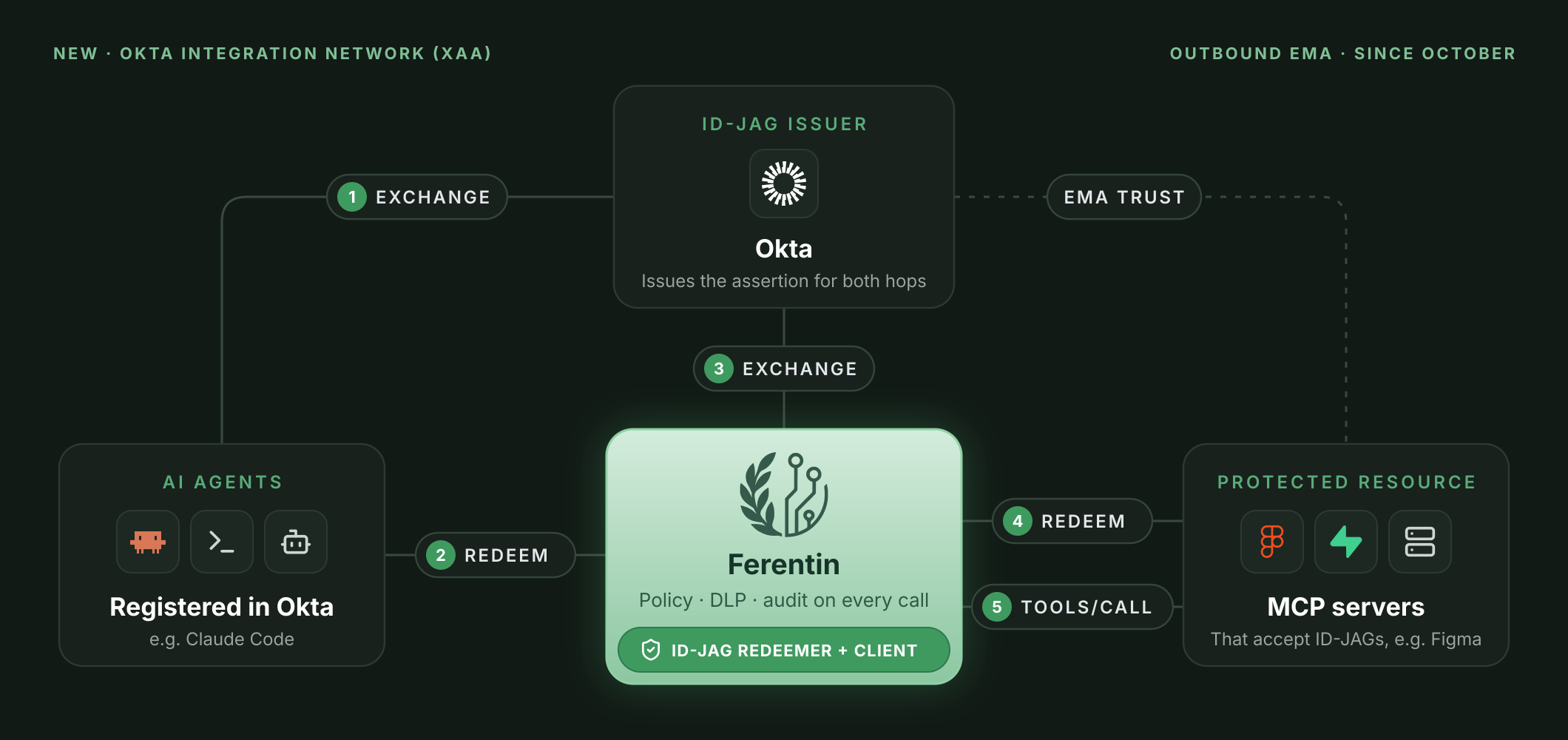
With the OIN integration, Ferentin acts as an XAA resource app. The flow uses two standard OAuth steps:
- The employee signs in to the AI agent with Okta. Nothing new happens here.
- The agent asks Okta for an ID-JAG addressed to Ferentin. Okta checks that the agent has a managed connection to Ferentin and that the employee is assigned to it. If either is missing, Okta refuses and the agent gets nothing.
- The agent redeems the ID-JAG at Ferentin. Ferentin's authorization server validates the assertion and returns a 15-minute access token for Ferentin's MCP endpoint. The token records which agent acted on the employee's behalf, so the audit trail shows the agent as well as the user.
- The agent calls Ferentin's MCP endpoint. From here on, every call goes through Ferentin's policy, data loss prevention and audit, the same as for any other client.
The agent acts as the same Okta user who signs in to the User Console, so policy and audit treat it as that person, acting through that agent. Employees don't need to be created in Ferentin first either. Ferentin provisions the user just in time from the Okta assertion, so access follows your Okta assignments.
Okta at the front door, Ferentin on every call
An IdP is the right place to decide whether a connection should exist. It isn't built to inspect what happens inside that connection. Once an agent has a token, the IdP doesn't see the tool calls it makes, the arguments it passes or the data that comes back.
Ferentin covers that part. For every MCP call, it checks which tools this user and this agent may call. It scans arguments and results for sensitive data and redacts or blocks them by policy. It also requires a human approval for high-risk actions and records the call as audit evidence.
Okta also appears on the other side of the gateway. In October we shipped outbound Enterprise-Managed Authorization. There, Ferentin asks Okta for an ID-JAG whenever it needs a token for an upstream MCP server. With the OIN integration in place, Okta approves both hops: agent to Ferentin, and Ferentin to the upstream. Ferentin governs the traffic between them. The agent never holds an upstream credential, and disabling a user in Okta cuts off both hops.
Tested before it was listed
Okta reviews every OIN submission before publishing it. For this one, Ferentin passed:
- Okta's SSO tests for the OIDC sign-in flows, both IdP-initiated and SP-initiated.
- The xaa.dev conformance suite for Cross App Access. A real Okta-issued ID-JAG was redeemed at Ferentin's production authorization server, and the resulting token was used to call the Ferentin API.
No SSO tax, and no agent SSO tax
Single sign-on and Cross App Access are included on every Ferentin plan, including the free one. Many vendors charge extra for SSO, so smaller teams make do with local passwords and accounts nobody remembers to remove. Charging extra for agent SSO would repeat that mistake with AI agents. Every agent left out goes back to holding its own long-lived tokens, granted one consent screen at a time. Every Ferentin deployment should start out with your identity provider in charge, for the people and for the agents acting for them.
Getting started
- Add Ferentin from the Okta Integration Network in your Okta admin console, and assign the administrators and employees who will use it.
- Connect Okta as your identity provider in the Ferentin admin console, and route your email domains to it.
- Decide who administers Ferentin. Add your administrators with the narrowest role that does the job, or map Okta groups to Ferentin roles.
- Give each AI agent a managed connection to Ferentin under Okta's AI agent settings, scoped to
mcp. - Write the policy in Ferentin: which users and agents may reach which MCP servers, and which tools they may call.
The Okta setup guide walks through the sign-in setup step by step.
Agents that don't support XAA yet, such as Cursor, still sign in to Ferentin with standard MCP OAuth through Okta. They get the same governance on every call.
If you run Okta and more than one AI agent, talk to us about putting Okta in charge of which agents connect and Ferentin in charge of what they do.
Stay in the loop
Get the latest on enterprise AI security delivered to your inbox.